Loading HomeHelp…
We're getting things ready for you.
Loading HomeHelp…
We're getting things ready for you.
HomeHelp was made to be touched. On a tablet, estimates, inspections, projects, photos, and payments all live on a screen big enough to use with a customer standing next to you — and small enough to carry to the job site.
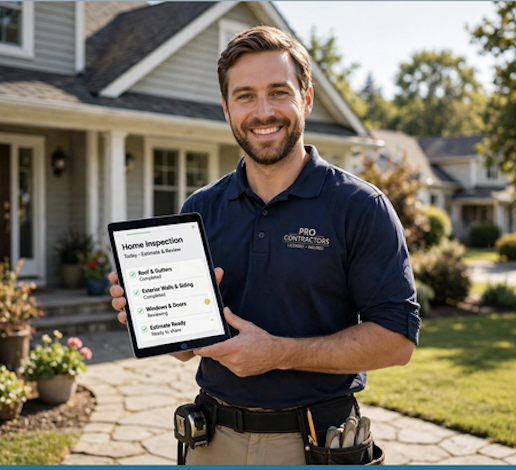
Most home work happens standing up — at the counter, in the driveway, on the roof. A tablet fits that better than anything else.
Great on the move — but small for plans, designs, and documents.
The sweet spot. Portable enough to carry, big enough to run a job and show a customer.
Powerful but clunky on a job site and awkward to share with a homeowner.
This is the real app — not a screenshot. Switch between a homeowner view and a contractor view to see how it feels on a tablet-sized screen.
Live interactive preview of HomeHelp.ai — tap around inside the frame.
From the first walk-through to the final payment, keep every step in one place your crew and your customer can both see.
Walk the property with the tablet and build the estimate or inspection checklist in real time — no notebook, no re-entry later.
Snap progress photos, before/after shots, and receipts straight into the right project. Everything stays organized automatically.
Present the quote on a big screen, send the invoice, and collect payment before you leave the driveway.
See your day's jobs on a large calendar, route between sites, and keep the crew in sync.
Assign tasks to team members and watch status move from Scheduled to Completed without a phone call.
The tablet answers missed calls as your AI receptionist and drafts estimates — so nothing falls through the cracks.
Leave a tablet on the counter and HomeHelp becomes the shared home hub — the to-do list, the maintenance schedule, the records, and the design ideas, all in one spot the whole family can use.
Explore My HomeMy Home, records, maintenance, projects, and the Home Handoff all visible at a glance on a screen big enough to actually read.
The shared to-do list and maintenance schedule live where the whole household can see them — on the kitchen tablet.
Review AI room designs and before/after ideas with the family on a tablet instead of crowding around a phone.
Read reviews and compare contractor quotes on a display that fits two at once.
You can use HomeHelp on any tablet you already own. But if you'd rather skip the setup, we'll ship you a tablet with HomeHelp already installed, configured, and signed in to your account — rugged case included.
Kits are configured to order. We'll confirm availability and details with you before anything ships.
Tell us a little about how you'll use it and we'll follow up with details on the kit that fits your work.
Buying for a team?
We offer bulk kits for crews, property management teams, and HOAs. Pick the number of tablets above and we'll put together options for your group.
No. HomeHelp is a web app that runs on any tablet you already own — iPad, Android, or Fire OS. The HomeHelp-ready tablet is simply a convenience: we configure it, install the app, add your profile, and ship it ready to work.
Right now HomeHelp needs a connection — photos, notes, and checklist updates save as soon as you're back in range of Wi-Fi or cellular, and the tablet's own camera and notes app cover you in the meantime. Offline capture and sync is one of the first things the native iOS and Android apps will add.
For most day-to-day field work, yes. The larger screen makes estimates, inspection checklists, photos, and customer-facing presentations far easier to read and share, while still being portable enough to carry.
Request one through the inquiry form on this page or contact our team. We'll confirm details, configure the device with your account, and ship it ready to go.